301 vs 302 (and 307, 308): which redirect to use when a URL changes
Updated October 13, 2026 · 6 min read · 6 sections

If the old URL is never coming back, use 301 or 308. If it is coming back, use 302 or 307. That rule covers most cases; the details decide whether forms still work and which address search engines show.
The five redirect codes side by side
| Code | Permanent | POST stays POST | Google treats it as | Use it for |
|---|---|---|---|---|
| 301 Moved Permanently | Yes | Not guaranteed | Strong signal: target becomes canonical | Moved pages, domain moves, http → https |
| 308 Permanent Redirect | Yes | Yes | Like 301 | Permanent moves of forms and APIs |
| 302 Found | No | Not guaranteed | Weak signal: source stays in results | Short outages, campaigns, tests |
| 307 Temporary Redirect | No | Yes | Like 302 | Temporary moves where POST must survive |
| 303 See Other | No | Always becomes GET | Weak signal | After a form submission |
The method column comes from the HTTP rules as MDN describes them: browsers may turn a POST into a GET after a 301 or 302, and they did so inconsistently, which is exactly why 307 and 308 were added. For ordinary page links, which are GET requests, 301 and 308 behave the same, and so do 302 and 307.
What search engines do with each
Google reads 301 and 308 as a strong signal that the target should be the canonical URL, and 302, 303 and 307 as a weak one, so the old URL may stay in results (Google: redirects and Search). An instant meta refresh counts as permanent, a delayed one as temporary. Server-side redirects are the most reliable; JavaScript redirects are a last resort.
The common mistake I see is a 302 for a permanent move, usually because it is a platform's default. The page still works for visitors, but you have told Google the old address is the real one. If the move is final, say so with a 301.
The reverse mistake is subtler. Browsers cache 301 responses, sometimes for a long time, so a wrong 301 can stick on visitors' machines after you remove it. When I am not sure a new rule is right, I ship it as a 302, test it, and switch it to 301 once it is correct.
When a temporary redirect is the right call
A 302 or 307 is correct whenever the original URL will be back: a product page sent to a "back soon" notice while stock is out, a page under maintenance for a day, a short campaign that borrows a URL, a login wall that sends you to sign in and then returns you. Language or country redirects from a neutral home page are also usually temporary, because the same URL serves different visitors. The test I use: in three months, should Google show the old address or the new one? Old means temporary.
Chains and loops
Every hop is a separate request. Google's crawlers follow up to 10 hops (Google Search Central), but Google advises short chains, ideally no more than 3, and redirecting old URLs straight to the final destination (Google: site moves). Browsers give up on long chains too.
A typical chain grows by accident over years of fixes. Take http://www.example.com/blog:
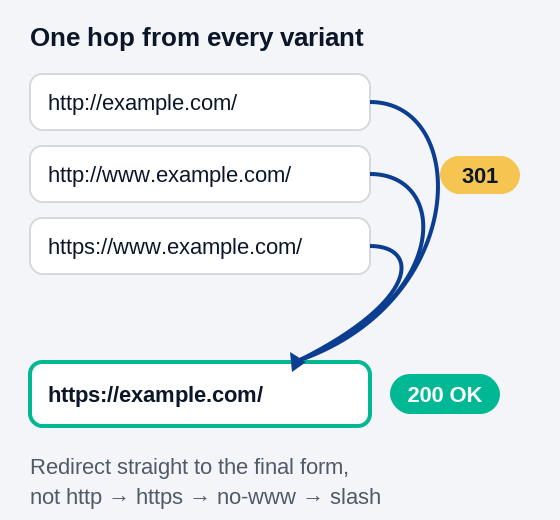
http://www.example.com/blog→ 301 to https (the TLS rule)https://www.example.com/blog→ 301 to the bare domain (the no-www rule)https://example.com/blog→ 301 to the slash version (the platform's rule)https://example.com/blog/→ 200
Three hops for one page. The fix is to send every variant to the final form in one hop, and to link the final form everywhere.
A loop is a chain that comes back to itself: /a → /b → /a. Visitors get a browser error and Search Console reports a Redirect error. Loops usually appear right after a configuration change, when two rules disagree, for example a CDN forcing https while the origin redirects back to http.
http → https and www in one hop
On nginx, two small server blocks do it, each with the full final address, so no request ever passes through an intermediate form:
server { listen 80; server_name example.com www.example.com; return 301 https://example.com$request_uri; }server { listen 443 ssl; server_name www.example.com; return 301 https://example.com$request_uri; }The second block needs the same certificate lines as your main site, and the main server block for example.com on port 443 then serves the pages. If your URLs end with a slash, link them with the slash, or the platform adds one more hop.
How to test a redirect
In the link checker, paste the old URL into the Single URL tab: the Redirect chain lists every hop with its code, warns when there are 2 or more, and labels each one permanent or temporary. The chain comes from Microlink's servers, so it shows what the server sends, not your browser's cache. From a terminal:
curl -sIL http://example.com/old-page | grep -iE "^(HTTP|location)"That prints each status line and Location header in order. One caution with browser DevTools: on a site that uses HSTS, Chrome shows a "307 Internal Redirect" from http to https that the server never sent. The browser makes it up from its own HSTS list, so do not copy that 307 into your report.
After setting up redirects for a move, I go through this checklist:
| Check | Pass when |
|---|---|
| Each old URL, all four http/https and www variants | One hop, 301 or 308, to the right page |
| The final URL | 200, not another redirect |
| Internal links and navigation | Point to the final URLs, no redirects |
| The sitemap | Lists only final URLs |
| The redirects themselves | Kept for at least a year, longer if old links still bring visits |
Google recommends keeping redirects "for as long as possible, generally at least 1 year" after a move (Google: site moves). I keep them as long as the old URLs still get visits. For finding the links that still point at old addresses, see how to find broken links on your website; for links that are already dead, how to fix broken links.
Questions and answers
What is the difference between a 301 and a 302 redirect?
A 301 says the page moved for good, so search engines move their signals to the new URL; a 302 says the move is temporary and the old URL stays in results. For visitors both look the same.
When should I use 307 or 308 instead?
When the redirected request may be a POST, such as a form or an API call: 307 and 308 keep the method and body, while browsers may turn a POST into a GET after a 301 or 302.
How many redirects is too many?
Link the final URL so there are none. Google's crawlers follow up to 10 hops, but Google advises no more than 3, and every hop adds a round trip for visitors.
How do I check where a URL redirects?
Paste it into the Single URL tab to see every hop with its status code, or run curl -sIL with the URL in a terminal.
How long should I keep a redirect?
Google recommends at least a year after a move; I keep them as long as the old URLs still receive visits.