Link Checker — URL Status
A reader says a link is dead, or a site move is coming up: paste the URL into the link checker to see its status code, every redirect hop and the final address, or scan a whole page for broken links.
Link Checker
1 Paste a link, a page or a list 2 Press the button 3 Fix what turns red, copy the report
Enter = check · Ctrl+Enter in a text box · Esc = stop
Pasted HTML and files never leave your browser. To check a link, your browser looks up its domain at Cloudflare DNS, asks Microlink for the status code and contacts the link itself. Nothing is sent to us.
- Cloudflare DNS (cloudflare-dns.com) gets only the domain name — a domain that does not exist is a dead link for everyone.
- Microlink (api.microlink.io) gets the link and opens it from its servers: exact status code and every redirect. Free plan: 25 checks a day; a scan by URL uses one for the page’s HTML.
- Your browser sends one HEAD request to the link (no cookies, no referrer) and measures the response time. Browsers hide another site’s status code, so these rows say “Unconfirmed”.
- crt.sh gets the host name of an https link (Single URL only) to show the latest certificate logged for it.
- archive.org gets a broken link when you ask for an archived copy.
Press Check URL to see the sample link’s status code and every redirect it takes — then paste your own link, a page or a whole list.
Check a link, scan a page, or audit a list
Single URL checks one address in depth. Scan a page checks every link on a page. List or file takes a pasted list, a sitemap.xml, a bookmarks export or any text with URLs. The first two were called Single URL Check and Scan Page Links on the old version of this page. A sitemap is also held to the sitemaps.org rules: absolute URLs on one host and protocol, under 2,048 characters each, at most 50,000 per file.
Nobody gets an alert when a page they link to disappears. Pew Research Center found that 38% of web pages that existed a decade earlier could no longer be reached, and 23% of news pages had at least one broken link.
The single URL report
Paste an address into URL to check and press Check URL; a missing https:// is added. You get a big status pill such as 404 Not Found, a one-line meaning and the Redirect chain hop by hop. When I checked http://en.wikipedia.org/wiki/Link_rot, it answered 301 to the https address, which answered 200: one harmless http → https hop, but in your own HTML I would link the final URL.
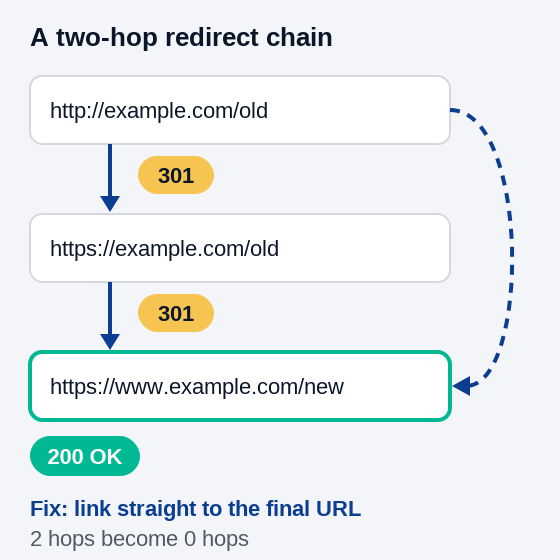
A link that goes 301 to the https version, then 301 to a new www address before the 200 is a two-hop chain, and the checker warns "link straight to the final URL". At a hypothetical 120 ms per round trip on a phone, that is 2 × 120 = 240 ms before the real page starts loading. A URL that repeats in its own chain is reported as a loop. Permanent and temporary redirects get different chips (301 vs 302, 307, 308).
Response time (your browser) is measured around one request from your connection, DNS and TLS setup included. HTTPS says whether the link, or the address it redirects to, uses https. For an https link the checker then asks crt.sh for the latest certificate logged for the host in Certificate Transparency logs, but only after DNS confirms the domain exists, and shows the days left, rounded down: under 30 is a warning. A certificate that ended 5 hours ago reads "expired 1 day ago", not "expires in 0 days" as the old version said.
Page scan results and filtering
Choose By URL or Paste HTML (or Upload .html) and press Scan page. Links are resolved the way a browser does it, <base href> included, and repeats become one row with a count. Tiles Total, OK, Redirects, Broken and Unconfirmed filter the table on click, chips such as Issues only or nofollow narrow it, and columns sort, broken first. After a migration I click Redirects first.
Load sample shows a page with known faults at https://example.com/blog/. Its 10 links become 9 rows, because post-2 (resolved to /blog/post-2) appears twice. Before any network answer, the audit finds a #reviews link with no matching id (Broken, exact), an image link without alt text, a sponsored "click here", an insecure http:// link, a nofollow on an internal link, and www.example.org without https://, which resolves to https://example.com/blog/www.example.org: a path on your own site, not the partner's domain. The javascript: and mailto: links are listed under Not checked. The other counts depend on what the linked servers answer when you run it.
What a browser-based link checker can and cannot see
A web page may not read another site's response: unless that site allows CORS, the browser returns an "opaque" answer with status 0 and no headers (MDN: Request.mode). There is no server of ours behind this page, so each status comes from a source that can see it, and every result names it in its Source badge: Exact — via Microlink, Exact — CORS response, Exact — DNS, Exact — page markup, or Best effort — your browser.
| Check | Source | How sure |
|---|---|---|
| Markup, URL syntax, sitemap rules | Your browser, offline | Exact |
| Domain exists | Cloudflare DNS | Exact: NXDOMAIN is dead for everyone |
| Status, redirect chain, final URL | Microlink's servers | Exact; may be cached up to a day |
| Site that allows CORS | Your browser | Exact final code, no hops |
| Reachable | Your browser, response hidden | Best-effort: Answered or No answer |
| Certificate | CT logs via crt.sh | Best-effort: the server may show another |
| Archived copy | Wayback Machine | Exact |
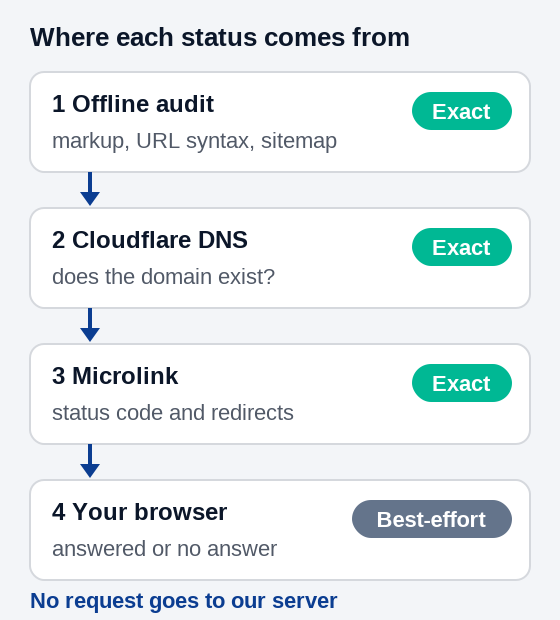
Best-effort results go to Unconfirmed, never Broken: inside a page, a blocked request, a timeout and an ad-blocker look the same, and I would rather you open one link by hand than delete a good one. Get exact status asks Microlink, whose free plan allows 25 requests a day per visitor; when they run out, DNS and browser checks keep working. A run checks up to 200 links; Check next 200 continues after 30 seconds.
Pasted HTML and files stay in your browser. A link check sends the hostname to Cloudflare DNS, the URL to Microlink (archive.org for dead links) and one request to the link; for an https link in Single URL mode, crt.sh also gets the hostname once DNS has confirmed the domain. Nothing reaches us; private addresses like 192.168.1.1 are never contacted.
HTTP status codes for links: reference table
| Answer | Meaning | What to do |
|---|---|---|
| 200 OK | Works | Nothing |
| 301 Moved Permanently | Moved for good | Update the link |
| 302 Found, 307 Temporary Redirect | Temporary move | Keep if intended |
| 308 Permanent Redirect | Like 301, method kept | Update the link |
| 400 Bad Request | Request unreadable | Look for spaces, typos |
| 401 Unauthorized | Login required | Link a public page |
| 403 Forbidden | Exists but refuses | Often bot protection: open it yourself |
| 404 Not Found | Nothing here | Fix, replace or remove |
| 410 Gone | Removed on purpose | Replace or remove |
| 429 Too Many Requests | Rate limited | Retry later |
| 451 Unavailable For Legal Reasons | Legally blocked, often per country | Link another source |
| 500 Internal Server Error | Server failed | Recheck; if it persists, broken |
| 502 Bad Gateway, 504 Gateway Timeout | Proxy got no answer | Usually temporary |
| 503 Service Unavailable | Overloaded or maintenance | Recheck later |
| DNS: no such domain | Domain does not exist | Replace or archive |
Google's crawlers treat 404 and 410 alike and drop those URLs, while 429 and 5xx only slow crawling (Google Search Central). So a 503 gets a recheck from me; a 404 gets fixed.
Link audit: nofollow, anchor text and insecure links
Markup is checked exactly, offline. Google wants sponsored on paid links, ugc on comment and forum links, nofollow when neither fits, combined with spaces or commas (Google: qualify outbound links). A nofollow on an internal link gets a note: for your own site, Google points to robots.txt. "Click here", "read more" and their equivalents in five other languages are flagged Generic anchor; an image link without alt is No anchor text, since Google reads the alt as the anchor (Google: crawlable links).
Traps I meet on almost every audit: href="www.site.com" without the scheme, #section links whose id was renamed (a bare #top is fine: browsers scroll to the top), and http:// links on an https page. Include images & scripts also catches http images and scripts as mixed content.
Exporting and keeping records
Copy report gives a text summary for an email or ticket, Copy broken links one URL per line. Download CSV adds Final URL, Redirect hops, Anchor text, rel, Issues and Archived copy, with commas in English and semicolons elsewhere so Excel splits it. Recent checks keeps your last 10 runs, old history included. Find archived copy asks the Wayback Machine for a snapshot of a dead link. Next steps: how to fix broken links and finding broken links on your whole website.
The cases every result has to pass
Each rule is pinned to a control case the tool's test page checks. I recomputed the URLs with Python's urljoin (same RFC 3986 rules as the browser here). Rows 1 and 2 are the bug behind the old version's false 404s.
| Input | Expected result |
|---|---|
Page /blog/post/, links post-2, ../about/, ?page=2 | /blog/post/post-2, /blog/about/, /blog/post/?page=2 |
Page /blog/, link post-2 | /blog/post-2 (old version: /post-2) |
On example.com: www.example.com, blog.example.com | Internal, External |
| 200, 200, 301 → 200, 404, 410, 500, no such domain, Answered, No answer, mailto | Total 9 = OK 2 + Redirects 1 + Broken 4 + Unconfirmed 2; 1 not checked |
| Microlink: 301, then 404 | Broken, pill 301 → 404 |
| DNS: NXDOMAIN | Broken; Microlink and the site not contacted |
Same-page links #reviews with no such id, and #top | Broken (Missing #anchor); OK, since browsers scroll to the top |
| Certificate ended 5 hours ago | expired 1 day ago |
Days left = floor((end − now) / 1 day); a past end shows as "expired N days ago", N rounded up.
Guides
 How to find broken links on your whole websiteSearch Console, sitemap, crawler and server logs: what each method finds, what it misses, and the order to fix broken links in.6 min read
 How to fix broken links: redirect, replace, or link an archived copyA decision table for every broken link: 301 your own moved pages, replace dead sources, or link the right archived copy.5 min read
 301 vs 302 (and 307, 308): which redirect to use when a URL changesPermanent or temporary, method kept or not, what Google does with each code, and how to fix redirect chains and loops.6 min read
Questions and answers
What HTTP status codes does the link checker detect?
Any code a server sends, with a plain meaning for the common ones. Exact codes come from Microlink's servers, from the link itself when it allows CORS, or from DNS for dead domains; when none of these is available, the row says Answered or No answer instead of guessing.
How many links can the page scan mode check?
Up to 200 links per run (the old version stopped at 100); Check next 200 continues after a 30-second pause, up to 10 runs an hour. Extracting and auditing the links has no such limit, for pages and files up to 5 MB.
Does the link checker verify SSL certificates?
In Single URL mode it shows whether the link, or the address it redirects to, uses HTTPS. For an https link whose domain DNS confirms, it adds the latest certificate logged for the host in public Certificate Transparency logs, with days left and a warning under 30 days. The server could still present another certificate, so if the dates look wrong, click the padlock in your browser.
Can I export the scan results?
Yes. Download CSV includes the final URL, redirect hops, anchor text, rel, issues and archived copy for every row; Copy report gives a text summary and Copy broken links a plain list.
What is the difference between Single URL Check and Scan Page Links?
They are now called Single URL and Scan a page. Single URL gives one address in depth: status, full redirect chain, certificate and timing; Scan a page checks every link on a page and audits its markup. The third tab, List or file, does the same for a list, a sitemap or a bookmarks file.
Why does a working page show a 403 or 405 status?
Many sites block automated requests or refuse the quick HEAD method, so they answer a checker differently from a person. Some anti-bot sites refuse Microlink too; the tool then marks the link Unconfirmed with the reason, and you should open it in your own browser before removing it.
Do broken links hurt SEO?
Google drops 404 URLs from its index, and a link to such a page passes nothing and leaves readers stuck. A dead internal link can also hide a page from crawlers if it was the only way in, so I fix internal ones first.
How do I find dead links in my bookmarks?
Export your bookmarks as an HTML file from the browser's bookmark manager and open it in the List or file tab. The table shows each bookmark's folder and date added, checks 200 links per run, and the file never leaves your browser.