How to fix broken links: redirect, replace, or link an archived copy
Updated October 13, 2026 · 5 min read · 6 sections

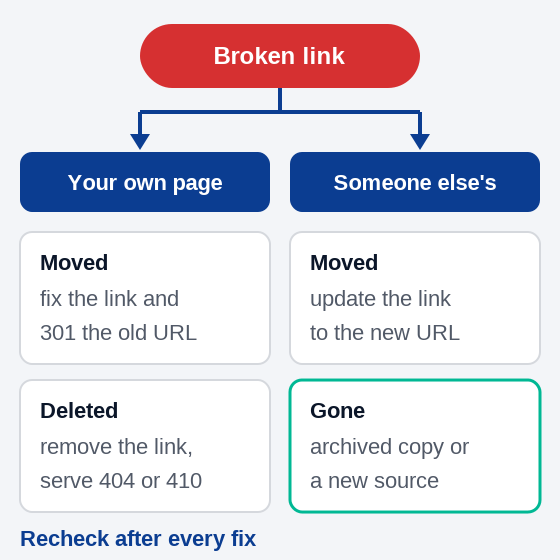
The quickest fix for a broken link, deleting it, is often the wrong one. A dead reference may have an archived copy that keeps your argument intact; a 404 on your own site may have backlinks that a single 301 would save. Before touching anything I ask two questions: whose page is it, and did it move or vanish?
The decision table
| Situation | Best fix | Why |
|---|---|---|
| Your page was renamed or moved | Edit the link to the new URL, and 301 the old URL to it | Bookmarks and other sites still use the old address |
| Your page was deleted, a close replacement exists | 301 to the replacement | Visitors land on the nearest answer |
| Your page was deleted, nothing replaces it | Remove or rewrite the links; the old URL returns 404 or 410 | A redirect to an unrelated page helps nobody |
| Their page moved | Update the link to its new address | Check the Redirects to column first |
| Their page is gone, you cite it | Link an archived copy, labelled as such | Readers can still verify the source |
| Their domain no longer exists | Archived copy or another source; never leave the link | Dropped domains get re-registered by strangers |
| 403, 429 or 503 from a big site | Open it in your browser before changing anything | Usually bot protection or a busy server |
| A page that says "not found" with status 200 | Treat it as broken (soft 404) | The status lies; the content does not |
Fixing broken internal links: source first, redirect second
Always edit the link itself. A redirect is a safety net for the people and sites you cannot edit, not a replacement for fixing your own HTML. Once the links are right, add a 301 from the old URL so nothing outside is lost. On nginx that is one line inside the server block:
location = /old-page/ { return 301 /new-page/; }On Apache, in .htaccess: Redirect 301 /old-page/ /new-page/. On WordPress, a redirect plugin or the same server rules work; after changing the permalink structure, check a handful of old URLs, because the platform only redirects some of them by itself.
Do not send every missing URL to the home page. Google says that many old URLs redirected to one unrelated page, such as a new home page, may be treated as soft 404s (Google: site moves), and visitors land somewhere they did not ask for. Redirect to the closest equivalent, or let the URL return 404.
404 or 410 for a page you removed?
Google's crawlers treat 404, 410 and the other 4xx codes, except 429, the same way: the URL is dropped from the index (Google Search Central). I still use 410 Gone for deliberate removals, such as a discontinued product, because it tells people and other tools "this was removed on purpose". Do not lose sleep over the choice; the real mistake is returning 200 with a "page not found" message.
That mistake is a soft 404: a page that looks like an error but answers 200 OK. Search Console reports it under Soft 404, and a status-only checker happily calls it OK. If your platform serves its "not found" template with 200, fix the server so the template comes with a real 404 status.
Replacing a dead external link
Outbound links rot on their own schedule. I work through these steps in order and stop at the first that works:
- Check whether it moved. In the link checker, a redirect to a new address shows up in the Redirects to column; a final 404 after a redirect usually means the site restructured.
- Search the site itself for the page title or a distinctive phrase; many sites keep the content and change the URL.
- Try the domain root. If the home page answers, the organisation exists and may have a newer version of the document.
- Find an official alternative: the same report on the publisher's new site, the standard on its standards body's page, the paper on its journal page.
- Link an archived copy when the content itself matters and nothing replaces it.
- Remove the link only when the sentence still makes sense without a source.
Linking an archived copy the right way
Find archived copy asks the Wayback Machine availability API, which returns the single snapshot closest to a given time (Wayback API). The tool asks without a time, so it gets the most recent capture, and the most recent capture of a dead page is often the error page itself or a parked-domain ad. If that is what you see, ask the API yourself with timestamp=YYYYMMDD for roughly when you first cited the page; that gets you the version you actually read.
Before linking, open the snapshot and check three things: it shows the content you cited, not a cookie wall or login screen; its status was 200; and it is the right page, not the site's home page after a redirect. Then keep the original URL visible, for example "Original page (archived copy)", so readers know what they are looking at. In the CSV export, the Archived copy column holds the snapshot address for every broken row, which makes a long reference list quick to repair.
Bookmarks and reference lists
Bookmark files rot faster than websites, because nobody maintains them. Export your bookmarks as HTML from the browser's bookmark manager and open the file in the List or file tab: it shows the folder and the date added for each link, and the file never leaves your browser. Click the Broken tile, then decide per folder: archive the research links, delete the shopping ones. For a document's reference list, paste the text; the tool pulls out every URL and keeps Markdown link text as the anchor.
Finding the broken links in the first place is covered in how to find broken links on your website, and choosing a redirect code in 301 vs 302.
Questions and answers
Should I redirect all broken pages to my home page?
No. Google may treat many old URLs redirected to one unrelated page as soft 404s, and visitors land where they did not want to be. Redirect to the closest equivalent page or return 404.
Is 410 better than 404 for a deleted page?
For Google they work the same: the URL is dropped from the index. 410 is a clearer signal to people and other tools that the removal was deliberate.
How do I find an archived copy of a dead link?
Use Find archived copy on a broken row for the latest snapshot, or ask the Wayback Machine directly for one from around the time you cited the page, and check that it shows the real content.
What is a soft 404?
A page that says the content is missing but returns 200 OK. Fix it by making the server send a real 404 or 410 status with the error page.